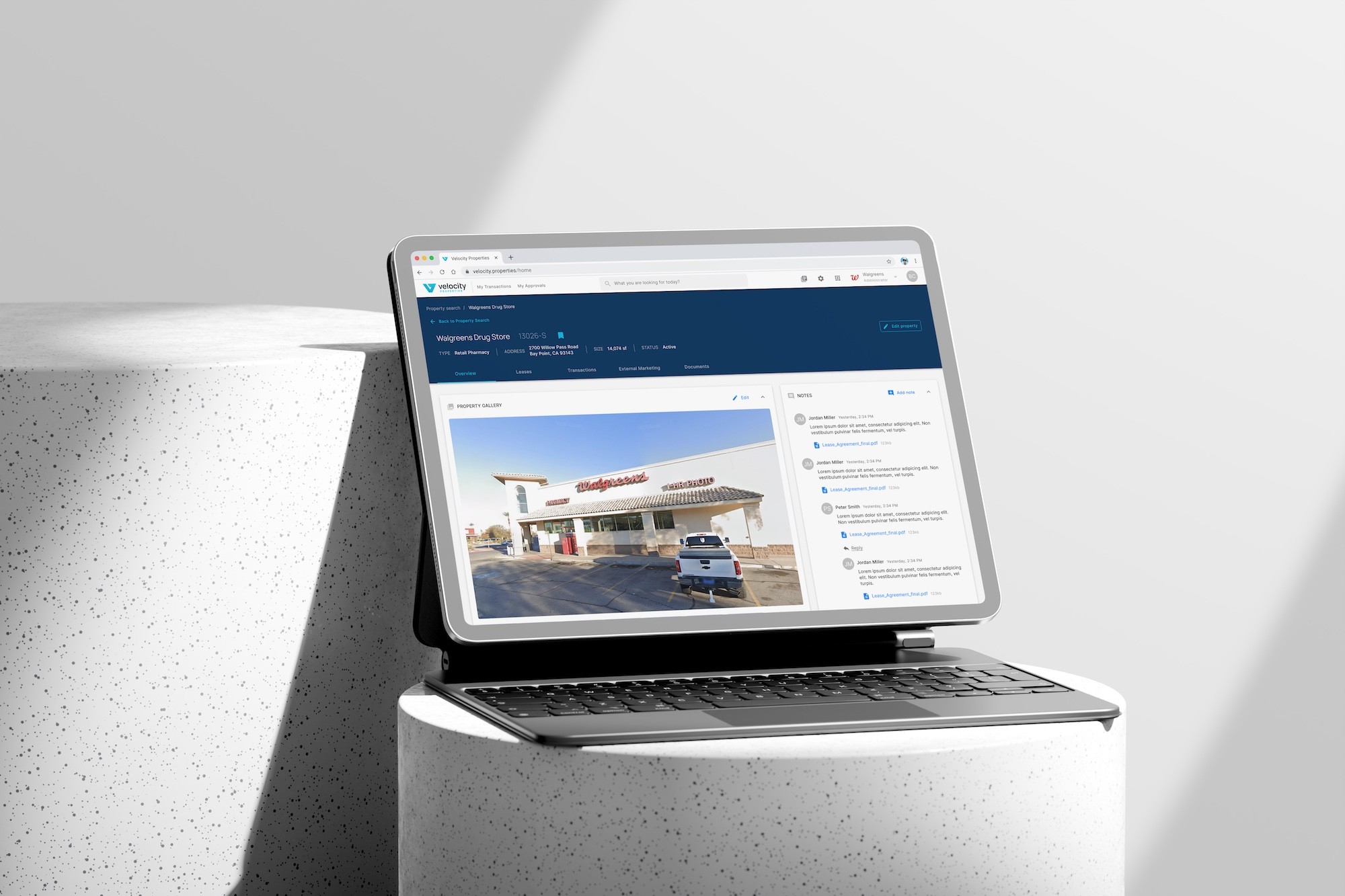

Replacing fragmented real estate operations with one scalable platform.
Velocity was created to bring property records, transactions, approvals and operational work out of spreadsheets, email chains and disconnected tools.
I joined early and led product design from concept to production-ready delivery. My role was to make the platform feel connected while giving different teams the detail their work required.
This case study covers the shared platform. Walgreens provides the initial enterprise rollout context; Link Logistics supplies the development-project design examples. PIM is a separate product case study.
01 / problem
High-value portfolios.
Outdated workflows.
The scale of the portfolios had outgrown the way teams managed the work. Property records, leases, inspections, budgets and documents were spread across multiple systems. Approvals and follow-up often moved through email.
That fragmentation made it harder to see the full picture, keep reporting consistent and know whether information was current. Teams had to gather the context before they could move a decision forward.

Legacy approval forms required teams to manually compile property and lease information before decisions could move forward.
Scattered information
Related records and documents were difficult to find together.
Slow approvals
Email chains and manual handoffs made progress harder to track.
Limited visibility
Disconnected information obscured what needed attention across the portfolio.
Repeated admin
Fragmented processes created duplicate effort.
Inconsistent reporting
Teams had less confidence in the information behind operational decisions.
THE SOLUTION DIRECTION
Connect the information
with the work around it.
The goal was a common platform for critical real estate workflows: a place where teams could find the record, understand its status and take the next action.
I led the information architecture, workflows, interaction design, UI, prototypes and design system. I worked with stakeholders on requirements and with developers on interface behaviour.
Connect the work
Centralise workflows and improve visibility across properties and teams.
Reduce friction
Reduce repetitive administration and help approvals move forward.
Support growth
Create a consistent foundation for different customers and future modules.
These were the project goals. The outcome section distinguishes delivery and scale from improvements that need measured evidence.
02 / PEOPLE & TASKS
One platform.
Several ways of working.
The differences were in responsibility, information needs and working environment. An administrator defining a process, a reviewer making a decision and an inspector recording findings needed different experiences.
I designed around those tasks while keeping their records and shared behaviours connected.
RESPONSIBILITY
WHAT MATTERS TO THEM
DESIGN RESPONSE
Configure the process
Define rules and evidence requirements before others use them.
Reusable templates, workflow settings and validation.
Prepare and manage work
Gather information and follow a deal or project through its lifecycle.
Connected record views, documents and visible status.
Review a decision
Understand the request, its evidence and the action required.
Approval tasks, process context and step-level detail.
Plan the finances
Understand the latest outlook and how it differs from the baseline.
Financial comparisons, versions and review states.
Inspect in the field
Capture findings and supporting media while on site.
Tablet-specific inspection approaches.
These are task groups represented in the design work, rather than formal research personas.

Velocity’s role-based permissions matrix, defining what each user group can view, edit and manage, with transaction access restricted by assignment where appropriate.
03 / information architecture
Organise the platform
around the work.
A property, a deal and a development project are related, but their lifecycles differ. The navigation needed to make those relationships clear while giving each area enough room to work.
Portfolio views helped users find relevant records. Contextual workspaces then brought the detail together. Development projects received their own header and sections because financials, plans, risks and evidence needed to stay connected over time.
The trade-off
Contextual navigation introduces variation. Shared headers, interaction patterns and terminology help that variation remain understandable.

A simplified view of Velocity platform structure, grouping eight workspaces into property and leasing, transactions and operations, and shared platform services.

The record in context. A Walgreens transaction workspace keeps related information together. Original design screen with sample content.
Similar content.
Different questions.
A Document Library answers which files exist. A Document Tracker answers which expected documents are present. Keeping those purposes distinct helped the navigation reflect what users needed to know.
04 / Design decision / Workflow engine
Approval rules people can
configure and understand.
Different deals required different reviewers and evidence. Some stages followed a sequence; others involved alternative approvers or committees. A fixed path could not express that range.
I designed two related experiences: one for defining a reusable process, and another for acting on a live request.
BEFORE THE WORKFLOW RUNS
Configure the process.
Set the initiating event, required information and documents, step settings and approval route. Save a draft, validate the workflow and publish it when ready.
WHERE A REQUEST IS LIVE
Understand and act.
See where the request sits in the process, inspect a selected step and access the information needed for the decision.

Live Approval: Phases and individual steps make the request’s progress visible. Public demonstration screen from Bermwood.

A shared approval workflow connecting requests, reviewer tasks and decisions across Velocity’s modules.
A small control.
A large consequence.
The configuration editor separates whether a field is required from whether it appears on the approval screen. One controls what the process depends on; the other shapes what its reviewer sees.
Flexibility brings
responsibility.
More configuration creates more opportunities for incomplete setup. Draft, validation and publication states give administrators a clear lifecycle and a place to check their work.
WHAT THIS ENABLED
Administrators could define reusable approval processes.
Reviewers could inspect a live request with its route and supporting evidence in context.
Creating an approval workflow by defining its trigger, deal types, template and required data.
05 / Design decision / Development finance
Help users understand
what changed in the numbers.
Development teams need more than the latest project cost. They need to compare a changing forecast with the underwritten budget and understand the variance.
I made that relationship explicit in the Link Logistics financial experience. The baseline, current forecast and variance kept their own meanings, supported by versions and validation states.
Showing only the latest number would remove the context needed to interpret change.

Development project overview comparing the underwritten budget, current forecast and variance.
Keep context fixed.
Stable labels and totals help users retain their place across categories and time periods.
Offer levels of detail.
Roll-up categories connect individual cost items with higher-level totals.
Make state explicity.
Editing, version selection and validation distinguish work in progress from reviewed information.
The trade-off was density. Specialist work needs detailed figures,
so I used structure and hierarchy to keep those figures interpretable.
WHAT THIS ENABLED
Users could interpret the outlook against a baseline, inspect the underlying detail and see the forecast’s version and review state.
Assumptions, timing
and funding.
Leasing Assumptions captures expectations about future leasing, with notes and warning states. Cash-flow forecasting adds timing to the financial picture. Cash Flow Sources provides a separate view of funding.
06 / Design decision / Property inspections
Capture and review
are different tasks.
Someone recording findings on site has a different task from someone evaluating a completed inspection. The design work includes two iPad mini interaction approaches, separate review screens and a structured PDF report.
I explored tablet-specific layouts for capture. The review experience organised the completed inspection for evaluation, while the PDF gave the information a format that could stand on its own outside the application.
Connect the work
Centralise workflows and improve visibility across properties and teams.
Reduce friction
Reduce repetitive administration and help approvals move forward.
Support growth
Create a consistent foundation for different customers and future modules.
These were the project goals. The outcome section distinguishes delivery and scale from improvements that need measured evidence.
WHAT THIS ENABLED
An inspection could support field capture, office review and a formal report, with a layout suited to each task.

Inspection workflow coordinating property teams, vendors and tenants from request to scheduling and completion.
BRANDING
One identity.
Across the product.
I also designed the Velocity identity and iPhone app icon. This connected the product experience with the branding people encountered across the application.
The wordmark below is the published Velocity identity.




08 / DELIVERY & OUTCOMES
From early design
to enterprise use.
The initial Walgreens implementation moved from concept to production over nine months. The project involved more than 10,000 stores and approximately $2.8 billion in annual rent.
Velocity brought related records and operational workflows into a connected platform, supporting configurable approvals, development planning, financial review and inspection work.
IMPACT AT LAUNCH (2022)
0+
Stores in the Walgreens project context
$0.0B+
Approximate annual rent in the project context
IMPACT TODAY
0+
Across Enterprise Portfolios
$0.0B+
Tracked Through Projects
0
Mobile-first Inspections Completed
0+
Buy, Sell, Lease, Sublease Transactions Completed
0+
Deals Closed Through Velocity
Project figures supplied by Bermwood. They describe delivery and portfolio scale; they do not measure improvement caused by design
09 / REFLECTION
Shared rules.
Room for difference.
The main lesson was to look beneath a requested screen and understand the task it represented. Similar-looking forms can have different responsibilities. Different-looking modules can share the same interaction pattern.
Working across stakeholder needs made that distinction central to the design system. Reuse helped when it made the work more predictable. Specialisation was necessary when the workflow or environment demanded it.
What I would carry forward: make the rules explicit, keep decision context close to the task and plan measurement around individual workflows. That would make the next iteration more clearly informed by how people use the product.
Where the wider story continues
Four focused stories
behind the platform.
This overview connects the product. Each area can become a deeper case study with its own decisions, evidence and outcomes.
Workflow Engine
Routing, evidence requirements and the transition from configuration to live approval.
COMING SOON
Project Financials
Forecast versions, cash flow and specialist table interactions.
COMING SOON
Development Projects
Plans, risks, entitlements and evidence within a long-running project.
COMING SOON
Property Inspection
Tablet explorations, capture, review and report output.
COMING SOON
CreditS & CONTEXT
Credits & Context
Product design, design system and branding: Enes Gündoğdu.
Development and implementation: Bermwood Technologies.
Walgreens provides the initial enterprise rollout context. Link Logistics supplies the development-project design context. PIM is a separate product case study.
Portfolio, workflow and project overview images are public demonstration screens. The transaction screen is from the original design material.
Enes Gundogdu 2026
Making complex
work easier to use.